


Timeline Up
4.03.76K Reviews
App Specs
- Version
- 16.2.0
- Updated On
- License
- Free
- Downloads
- 10,000,000+
- Developer
- Rollic Games
- Categories
- Racing
- Platform
- Android, iOS
Screenshots
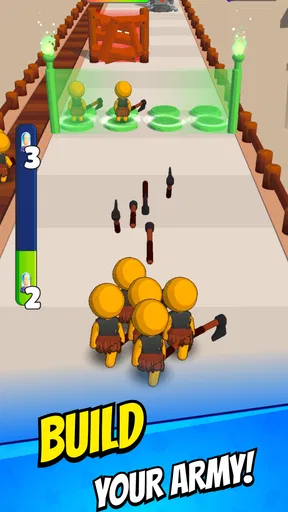
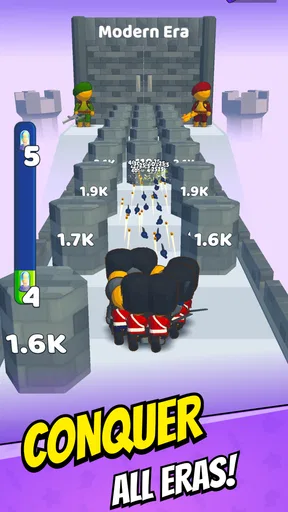
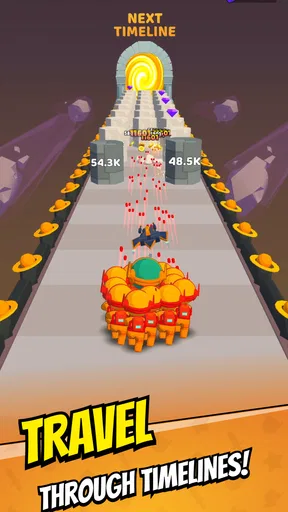
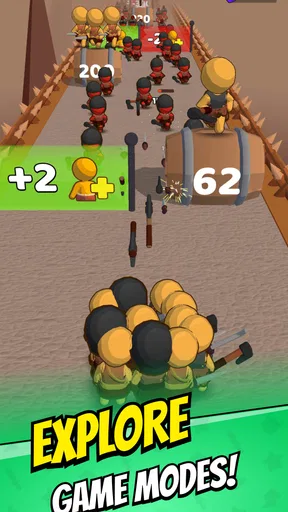
 Analysis by AppCompare
What makes Timeline Up interesting is the idea of moving through different timelines rather than simply racing around a conventional track. That focus gives the game a clear hook: progress is framed as evolution across eras, so each run feels like part of a larger forward journey. I find that concept more appealing for quick, casual play than a demanding racing simulator, where learning handling, tuning a vehicle, and competing for precise lap times are the main attractions.
A racing game built around moving forward
At its core, this is a casual racing game from Rollic Games, with a simple premise that is easy to understand: keep advancing through timelines. That makes it approachable when I want a game I can pick up without first studying a long set of rules. It also sets a different expectation from a traditional racer. I would come to Timeline Up for a light, progression-led experience, not for detailed vehicle setup or realistic driving technique.
The distinction matters when choosing what to play. Many racing games put the car and the track first, asking you to master corners, braking, or upgrades. Timeline Up’s identity instead rests on the sense of traveling forward through eras. If that broad, evolving journey is what catches your attention, the game has a recognizable angle; if you mainly want close control over a car or a realistic motorsport feel, a more simulation-focused option is likely a better match.
What that premise means in a short session
The timeline idea works best as a reason to keep a run moving rather than as a promise of deep racing strategy. I’d treat it as a game for spare moments: open it while waiting for a friend, take a short break between tasks, or play for a few minutes when I want something more active than a puzzle but less involved than a full race. The concept gives a session a sense of direction without requiring me to set aside a long stretch of time.
A useful way to approach a new run is to pay attention to how the game presents its forward progress before rushing through it. That helps me understand what the timeline is asking me to do and whether the pace suits me. In a game organized around moving onward, the feeling of progress is part of the appeal; taking a moment to notice how that progression works can make the experience more satisfying than treating every session as a race to finish as quickly as possible.
Where it fits among racing games
With a 4.0 average from around 65,000 ratings, Timeline Up has drawn a substantial audience, and it has passed five million installs. Those figures suggest that plenty of players are willing to try its unusual take on racing, though popularity alone does not tell me whether its style will suit you. It is free to download and rated for Everyone, which lowers the barrier to trying it, while optional in-app purchases range from $0.99 to $99.99 per item. I’d keep that purchase range in mind if I’m installing it for a younger player or prefer to avoid spending inside games.
Compared with a typical lap-based racer, the appeal here is less about reproducing the details of driving and more about the timeline-centered premise. Compared with an endless runner, it still sits in the racing category, but its defining identity is the sense of evolving across eras. That makes it a potentially good middle ground for someone who likes forward momentum but does not want a serious motorsport challenge. It is not the choice I’d make for competitive racing depth, a realistic cockpit view, or extensive car management.
Worth Reading Before You Choose

Baby Panda World Brings Quick Play to Modern Phones, but Its Game Library Feels Busy

ESPN’s Live Game View Makes Following Close Games Easier

QuizzLand Review: A Good Fit for Short Trivia Breaks, Not Every Player

Basketball Stars: Multiplayer Is Fast, but Can It Recover When Matches Go Wrong?

WEBTOON Turns Phone Updates Into a Better Reading Routine

Link to Windows Runs on Shared Habits, Not Social Feeds
Getting Started with Timeline Up
The first thing I noticed right off the bat was how clean and intuitive the user interface is. You know that feeling when you open an app and everything just makes sense? That's exactly what happened here. No need to rummage through endless menus or read a novel-length manual. I was up and running within minutes, which is a huge plus in my book.
Setting up my schedule was as easy as pie. You can drag and drop tasks into your timeline, adjust their duration, and even create recurring events with just a few taps. The app also syncs seamlessly with Google Calendar, which means I didn’t have to worry about manually inputting all my existing appointments.
Features That Stand Out
One of the features I found incredibly handy was the “Smart Suggestions” tool. It analyzes your past activities and suggests optimal times for upcoming tasks. Talk about having a personal assistant in your pocket! It’s perfect for someone like me who often struggles with prioritizing tasks.
Another feature I loved is the ability to set reminders with customizable notification sounds. I’m one of those people who needs a bit of a nudge to stay on track, and having a gentle reminder pop up is just what I need to keep me focused.
For those who love a bit of data (guilty as charged), Timeline Up offers insightful analytics that show you how your time is being spent. It’s a great way to identify any time-wasting activities and make adjustments accordingly.
The Experience So Far
Using the app has genuinely made my days more structured. It’s like having a little roadmap for the day ahead. I’ve noticed I’m procrastinating less and getting more done, which is always a win in my book. Plus, the satisfaction of checking things off my list is oddly rewarding.
Also, the app’s design is pleasing on the eyes. The color schemes are soft and not overly bright, making it easy to look at for extended periods. I appreciate the attention to detail in the app’s aesthetics.
Overall, my experience with Timeline Up has been nothing short of positive. It’s a nifty tool that delivers on its promise to manage your time effectively. If you’re looking for an app that helps you stay organized without causing headaches, give it a whirl. It might just be the game-changer you’ve been searching for.
Choosing it for the right kind of play
The strongest reason to try Timeline Up is its combination of racing and timeline progression, not a promise of elaborate driving controls. That distinction helps set expectations before installing. If I want something quick to understand and easy to revisit, the premise sounds appealing. If I want to shave seconds off a lap, compare vehicle statistics, or learn a demanding control scheme, I would look at a conventional racing game instead.
For an everyday example, imagine having a few minutes before a bus arrives. A short game session can fit that gap more naturally than a race that depends on sustained concentration or a long campaign. The same applies to a quick break at home: I can try a run, see whether the forward movement keeps me interested, and put the phone away without needing to remember a complicated sequence of objectives. That pick-up-and-play use is a better reason to choose it than expecting a deep racing hobby in miniature.
Small habits that make the experience clearer
I’d give the early stages enough attention to understand how the game signals progress through its timelines. Rather than tapping through every transition automatically, watching what changes from one stage to the next makes the central idea easier to appreciate. This is a modest but useful approach for a game whose identity depends on evolution: if I notice the progression, a short session feels more purposeful; if I rush past it, the distinctive premise can blur into generic forward motion.
I’d also decide in advance whether I’m comfortable with optional purchases. The game is free, but in-app items can cost from $0.99 to $99.99 each, a broad range that makes a little restraint sensible. For a child, I would check the device’s purchase controls before handing it over; for myself, I’d treat paid items as optional and judge the free experience first. Being rated Everyone makes the age label easy to understand, but it does not remove the need to manage spending thoughtfully.
Timeline Up is currently at version 12.4.0 and requires Android 7.0 or later on Android devices. It was released on January 15, 2024, and has 2.9 thousand written reviews alongside its ratings. I would use those details as practical context rather than as a guarantee that every device or player will have the same experience. If I’m deciding whether to install it, the more important question is still whether I want a casual, timeline-led racing game or a more technical racer.
Who is likely to enjoy it—and who may not
I’d recommend giving it a try if you like compact mobile games, enjoy seeing progress unfold, and are open to a racing concept that is not centered on realistic handling. It may also suit someone who usually skips racing games because they feel too demanding: the timeline framing sounds less intimidating than a game built around mastering a track. Its Everyone rating and free entry make it easy to consider as a casual option, especially when the goal is simply to find out whether the premise clicks.
I would skip it if the main reason I play racing games is competition, precise steering, vehicle customization, or a convincing motorsport atmosphere. Those preferences call for a game designed around those systems, rather than one whose main identity is advancing through timelines. I’d also be cautious if I’m looking for a game with no optional spending at all; the free download does not mean every item is free. For a player who dislikes in-app purchases, setting a firm limit or choosing a different game may be the more comfortable option.
In the end, Timeline Up stands out through a simple, specific idea: make forward progress across timelines the center of a casual racing game. Rollic Games has built a concept that is easy to approach, and its broad reach shows that many players have been willing to give it a look. I’d try it when I want a light game for spare minutes, while keeping my expectations realistic about the kind of racing it offers. If that blend of quick play and evolving progression sounds more fun than lap times and tuning, it is worth a download; if not, a more traditional racer will probably leave you happier.
Pros
- Intuitive user interface
- easy to navigate.
- Comprehensive timeline features for tracking.
- Seamless synchronization across devices.
- Customizable notifications for important events.
- Light on system resources
- runs smoothly.
Cons
- Lacks integration with some third-party apps.
- Limited offline functionality available.
- Occasional bugs with timeline updates.
- Premium features locked behind paywall.
- No dark mode option available yet.
FAQs for Timeline Up
What is Timeline Up and what does it offer?
Timeline Up is a productivity app designed to help users organize their schedules and tasks efficiently. It offers features such as customizable timelines, task reminders, and integration with popular calendar apps. Users can prioritize tasks, set deadlines, and track their progress all in one intuitive interface.
Is Timeline Up available for both Android and iOS devices?
Yes, Timeline Up is available for download on both Android and iOS platforms. You can find it on the Google Play Store for Android devices and the Apple App Store for iOS devices. Make sure your device meets the app's compatibility requirements before downloading.
Does Timeline Up require an internet connection to function?
Timeline Up primarily functions offline, allowing users to access and manage their schedules without an internet connection. However, some features, such as syncing with cloud services or calendar integrations, will require internet access to update and synchronize data across devices.
Are there any in-app purchases or subscriptions in Timeline Up?
Timeline Up offers a free version with basic features. For users seeking advanced functionalities like premium themes, additional integrations, or priority support, there is an option for in-app purchases or a subscription model. Details on pricing and features for the premium version can be found within the app.
How secure is my data on Timeline Up?
Timeline Up prioritizes user data security by employing encryption for data storage and transfer. The app also offers options for local backups and secure cloud storage, ensuring your information is protected. Users should review the app's privacy policy to understand how their data is handled and stored.


